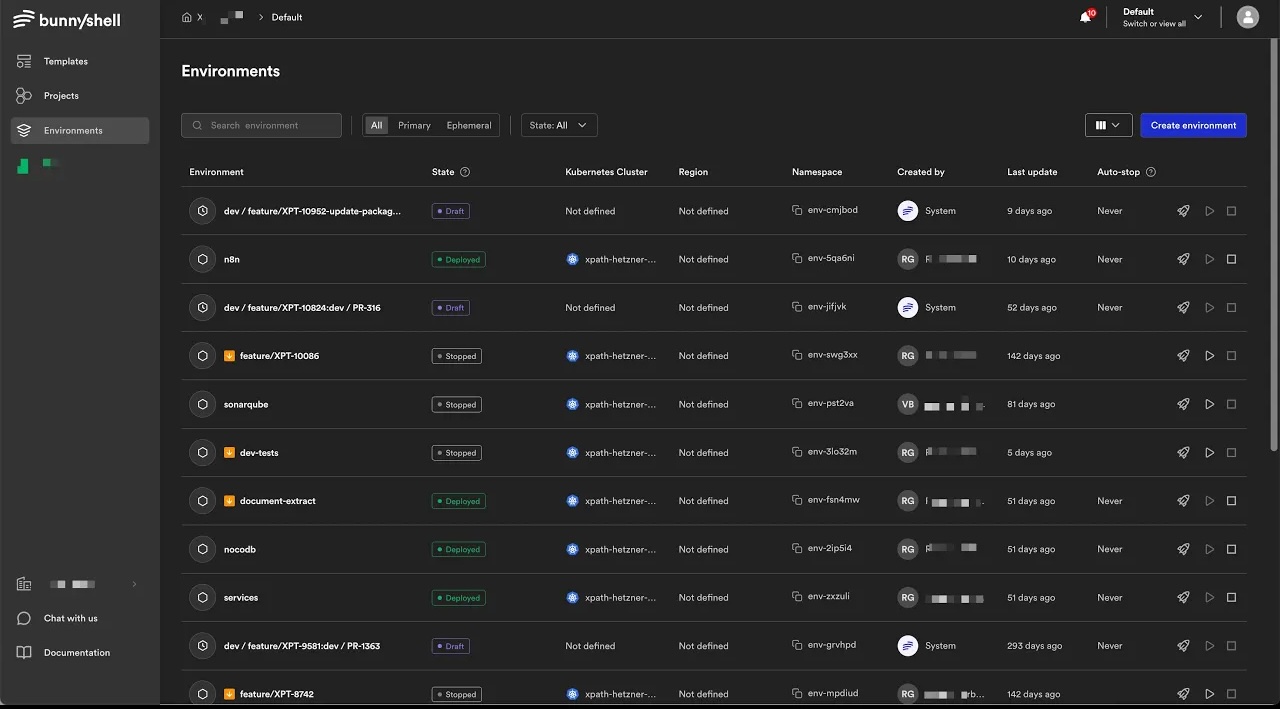
$ bns environments list
Ship Software
10x Faster.
Modern CI/CD, cloud development, preview, and ephemeral environments — all in one platform built for modern engineering teams.
No credit card required
// See Bunnyshell in action in 3 minutes
Used by engineering teams at






















$ cat how-it-works.md
How Bunnyshell works
Connect your repo
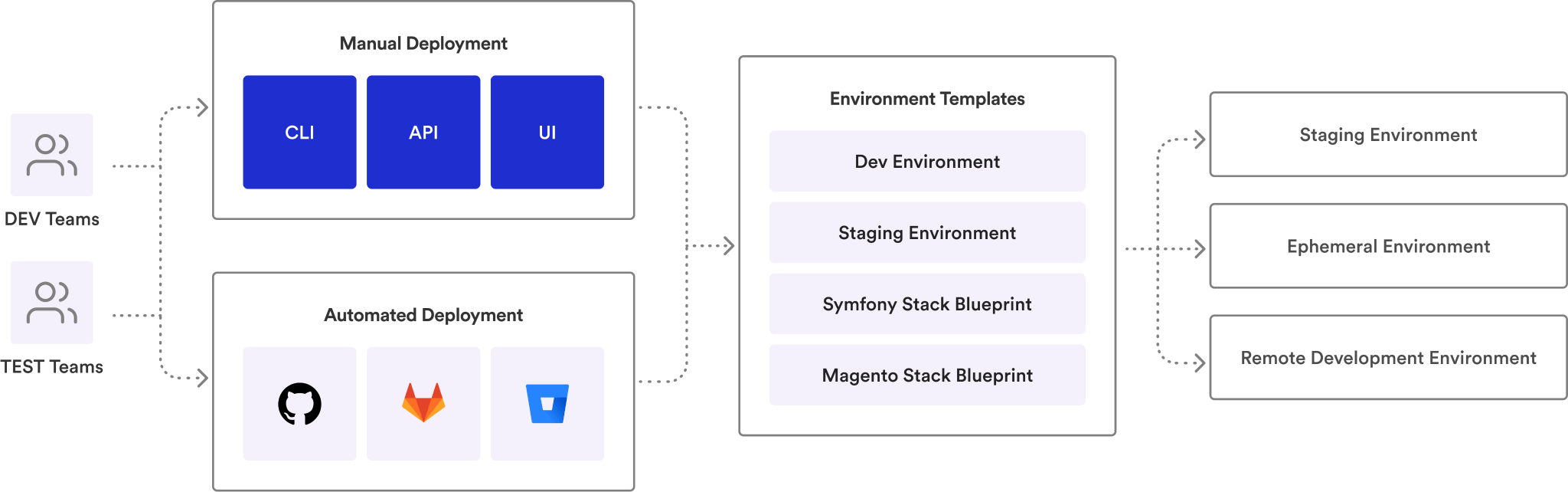
Link your GitHub, GitLab, or Bitbucket repository. Define your environment using Docker Compose, Helm, or Terraform — tools you already use.
 GitHub
 GitLab
 Bitbucket
 Docker
 Helm
Helm K8s
K8sOpen a pull request
Bunnyshell auto-provisions an isolated, full-stack environment for every PR. Share the preview URL with your team.
Merge and move on
Tests pass, code is reviewed, PR merges. The environment auto-destroys. No cleanup. No surprise cloud bills.
See it in action.
Deploy your first environment in under 30 minutes. 14-day trial, no credit card required.
Unified Environment
Management.
Centralize control of all your environments with a single global view. Create, clone, start, stop, and deactivate environments through one intuitive interface. Full oversight across projects, teams, and clusters.
- ✓Faster onboarding — new developers start coding in minutes with standardized, preconfigured environments
- ✓Self-service autonomy — teams create, pause, or discard environments without waiting on DevOps
- ✓Consistent & reliable — every environment mirrors production, ensuring predictable results across the stack
- ✓Clone any environment — duplicate a running environment in one click — same config, same data, new namespace
Ephemeral
Environments.
Every pull request gets its own full-stack environment — your app, your database, your infrastructure. Isolated, production-like, destroyed on merge. No more "who broke staging?"
- ✓Auto-deploy on PR open — environment spins up in minutes, with a shareable preview URL
- ✓Auto-destroy on merge — no forgotten resources, no bill creep
- ✓Full-stack replication — not just frontend previews. App + database + infrastructure
- ✓Git ChatOps — /bns:deploy, /bns:stop, /bns:start from PR comments

Remote
Development.
Code in a cloud replica of production from your local IDE. VS Code, JetBrains — real-time file sync, step-through debugging, zero local dependencies. Start coding in minutes, not hours.
- ✓Local IDE, cloud runtime — edit locally, changes sync instantly to your cloud environment
- ✓Remote debugging — step-through for Node.js, PHP, Java. Attach your debugger to cloud containers
- ✓Port forwarding — access any remote service locally, as if running on your machine
- ✓SSH access — drop into any container. Inspect logs, run commands, troubleshoot in real-time
Your entire stack,
in a single YAML file.
Define your app, databases, and infrastructure in bunnyshell.yaml. Version-controlled, reproducible, drift-free. Bunnyshell extends Infrastructure-as-Code to the entire environment — not just infra.
- ✓7 component types — Docker Compose, Helm, K8s Manifests, Terraform, Custom Docker Image, Static App, Generic
- ✓Dependency orchestration — dependsOn controls execution order; independent components deploy in parallel
- ✓Powerful variables — Twig-like interpolation with conditionals, filters, cross-component references
- ✓Variable Groups — share secrets and config across environments, override per-env
DockerKubernetesHelm Terraform
Templates &
Service Catalog.
28+ pre-built templates or bring your own from Git. Any team member spins up a full stack from the catalog — no DevOps knowledge required. The easiest way to set up your environment.
- ✓Pre-built templates — Laravel, Next.js, Sylius, Magento, Django, PyTorch, and more
- ✓Custom templates from Git — enforce org standards, compliance requirements baked in
- ✓Template Sync — detect drift between environment and template with built-in diff editor
- ✓One-click deploy — developers, QA, and product managers self-serve without tickets
Workflow Pipelines.
Dependency-aware.
Every environment action — deploy, destroy, start, stop — runs as a workflow of stages, jobs, and steps. Bunnyshell reads your dependsOn graph, parallelizes independent components, and sequences the rest. Deploy and Start respect dependency order. Destroy and Stop run everything in parallel.
- ✓4 lifecycle workflows — Deploy, Destroy, Start, Stop — each auto-generated from your environment definition. No pipeline YAML to write
- ✓Dependency-aware staging — dependsOn controls execution order across stages. Independent components run in parallel within each stage
- ✓Real-time DAG visualization — stages as columns, jobs within stages, step-by-step output with commands, stdout/stderr, and exit codes
- ✓Smart deploy strategies — RollingUpdate (zero-downtime) or Recreate. Auto-detects PVC usage and forces Recreate when needed
- ✓Managed or self-hosted runners — control concurrency, timeouts, and retry behavior. Use Bunnyshell runners or bring your own
Application & K8s
Logs.
Three log types, one interface. Pipeline logs show every workflow step with auto-expanded errors. Application logs stream live from running containers. Kubernetes logs surface pod events, manifests, and cluster-level diagnostics — no kubectl required.
- ✓Pipeline logs — every workflow job with timestamps, stdout/stderr, exit codes. Failed steps auto-expand and highlight in red
- ✓K8s Logs — real-time container output streaming. Filter by pod and container. Search across log lines
- ✓K8s Events — pod scheduling, image pulls, crash loops, OOM kills, restarts — all surfaced without cluster access
- ✓K8s Manifests — inspect the full YAML manifest for any running resource. Debug configuration drift in real-time
Built for Scale.
Not hello-world demos.
Run thousands of environments without crashing your cluster. Smart parallel deploys for complex apps with 100+ microservices. Bunnyshell deploys real-world applications with dependency control and full visibility.
- ✓Dependency chains — use dependsOn to control which services launch first — great for DBs, caches, legacy systems
- ✓Dynamic concurrency — set how many environments run in parallel — match cluster capacity in real-time
- ✓Built-in queuing & retries — handle quick-succession commits without pipeline collisions
- ✓Fully configurable — order, concurrency, resources, and visibility — all as code
Automate everything.
Full API & CI/CD control.
Use your stack, your pipelines, your rules. Trigger PR environments with GitHub Actions, CLI, or ChatOps — no lock-in, no friction. Common setup: GitHub PR → CI job → Call Bunnyshell API → Get live URL → Run Playwright tests.
- ✓Full API control — create, update, delete environments programmatically. Open-source Go SDK
- ✓GitHub Actions & GitLab CI — native integrations — trigger environments as part of your existing CI flow
- ✓Built-in queuing — handle quick-succession commits without collisions. Automatic retries on failure
- ✓Environment ready in seconds — even for complex apps — parallel deploys, queuing, and CI-built images supported
Your terminal. Your IDE.
Your way of working.
CLI
Create, clone, start, stop, deploy, port-forward — all from your terminal. Shell autocomplete, profiles, secrets management.
REST API & Go SDK
Full programmatic access. Provision environments, query status, trigger teardowns — integrate with any workflow.
MCP Server
AI-native environment management. Create, deploy, and manage environments from Claude Code or any MCP-compatible agent.
Git ChatOps
/bns:deploy, /bns:stop, /bns:start, /bns:delete — manage environments from PR comments. Auto-posted URLs and status.
Custom Domains
Assign custom domains to any environment. Per-component URL customization, load balancer config, IP whitelisting.
Webhooks & CI/CD
Trigger environment actions from GitHub Actions, GitLab CI, or any CI system. Fully scriptable, event-driven.
Deploy your first environment today.
14-day trial, no credit card. Free white-glove onboarding — we set it up with you. Most teams ship their first PR environment in under 30 minutes.
Teams that stopped
fighting over staging.


“Manual tests on Argo CD PRs now take me seconds. When you review dozens of PRs a day, that's a game-changer.”


“Automatically created BunnyShell environment based on PRs, speeding up the entire task implementation process.”

“From a release once in 2-4 weeks to multiple times per week, and nobody's stressed about it.”

“I can count on an integrated platform for managing our infrastructure — capabilities we don't have in-house, at a fraction of the cost.”

“I can do with Bunnyshell and a DevOps person what my clients are doing with 4 DevOps people.”
Cost & Lifecycle
Management.
Environments that manage themselves. Auto-sleep, auto-destroy, auto-update — so you stop paying for idle resources and your team never has to remember cleanup. Detailed cost analysis with grouping, filtering, and comparative charts.
- ✓Auto-sleep schedules — stop at 8 PM, start at 8 AM. Custom per environment
- ✓Auto-destroy on merge — no forgotten resources, no surprise cloud bills
- ✓Per-environment costs — Kubecost integration shows what each environment costs per hour. Group by project, cluster, or team
- ✓Termination protection — lock critical environments against accidental deletion
Environment Drift
Management.
Get notified when your environment configuration diverges from the template. Review changes through a built-in diff-editor, adjust settings, or acknowledge changes without modification. Keep environments aligned with the latest template versions.
- ✓Auto-detection — Bunnyshell notifies you when an environment drifts from its template
- ✓Built-in diff editor — review exactly what changed — line by line, component by component
- ✓One-click sync — pull template updates into your environment or acknowledge the divergence
- ✓Version tracking — see which template version each environment is running against
Enterprise-grade security.
Your data stays in your cloud.
Bunnyshell connects to YOUR Kubernetes cluster. Your code and data never leave your infrastructure. SOC 2, ISO 27001, and ISO 9001 compliant.



RBAC
Three-layer permission model: Policies, Resource Selectors, and Teams. Granular enough for enterprise.
SSO
Enterprise single sign-on. Integrate with your existing identity provider.
Network Isolation
Dedicated Kubernetes namespace per environment. Pods accessible only within their namespace.
Secrets Management
Environment variables and secrets handled securely. Never hard-coded, always encrypted.
IP Whitelisting
Restrict access to specific IP ranges. Control who can reach your environments.
Audit Logs
Full audit trail for every environment action. Who deployed what, when, and where.
Enterprise-ready from day one.
SOC 2 compliant. BYOC model. RBAC, SSO, audit logs — all built in. Book a demo to see how Bunnyshell fits your security requirements.
DORA Metrics,
Built In.
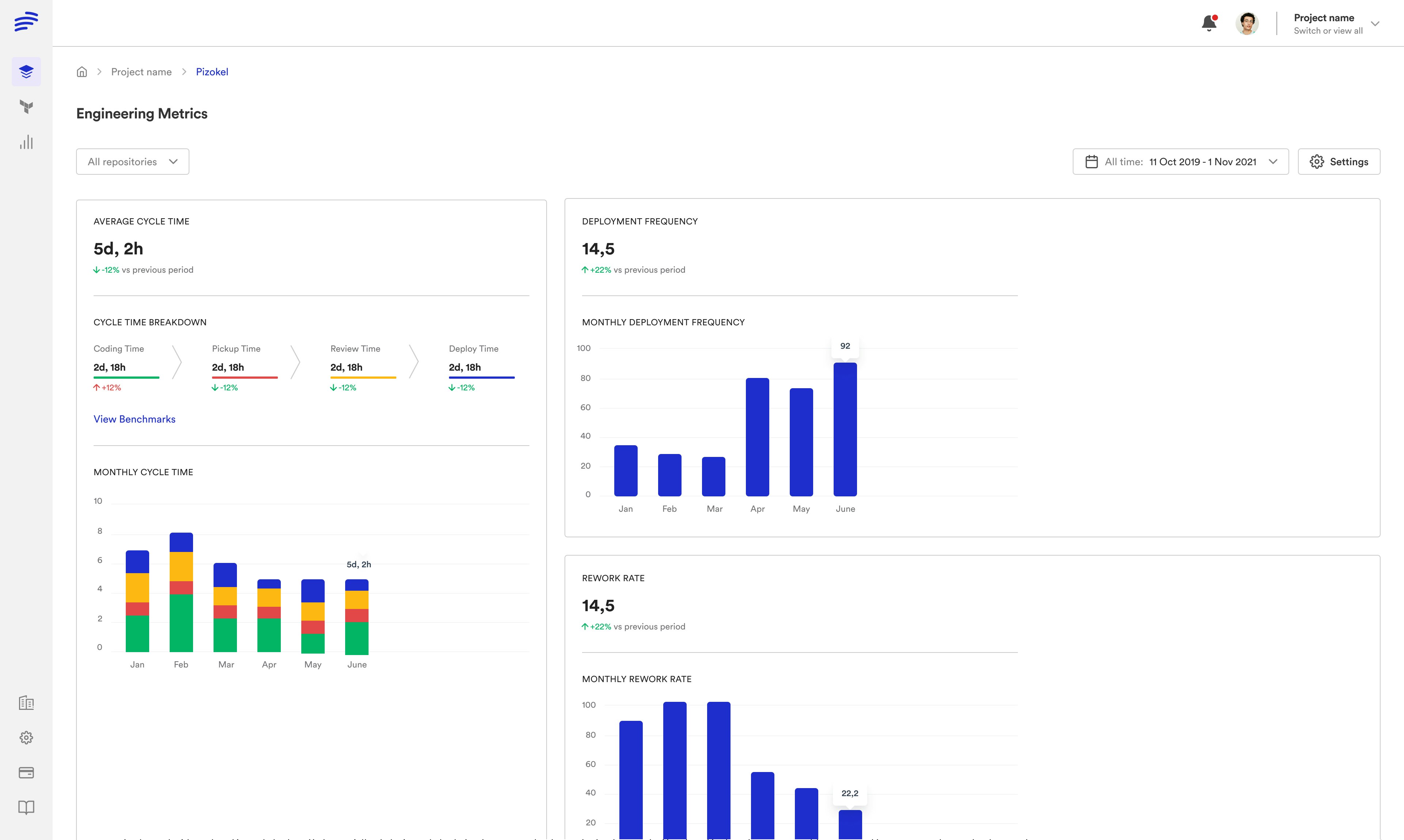
Prove your team is shipping faster. Track Cycle Time and Deployment Frequency across your repositories — without buying another tool. PR-based or tag-based release detection, monthly breakdowns, and per-repo analytics.
- ✓Average Cycle Time — measure how long from first commit to production deploy
- ✓Deployment Frequency — track how often your team ships — daily, weekly, monthly trends
- ✓Cycle Time Breakdown — see where time is spent — coding, pickup, review, deploy
- ✓Per-repo analytics — compare performance across repositories and teams
Full Configurability.
Per Environment.
Every environment has granular settings you can tune independently. From builder infrastructure to deployment runners, from workflow parallelism to custom URL handles — configure exactly what you need without touching other environments.
- ✓Builder Infrastructure — choose managed or self-hosted builders per environment
- ✓Workflow Settings — parallel jobs, status check timeouts, image pull policies
- ✓Environment Variables — inherited from project, overridable per environment
- ✓URL Handle — custom domains and URL handles per environment
12 Component Types.
One unified platform.
Docker Compose
Automatic conversion to Kubernetes resources. Health checks, volumes, cron jobs, ingress, and HPA — all from your docker-compose.yaml.
Application
Full application lifecycle management. Build, deploy, start, stop, and destroy with dependency orchestration.
Service
Long-running services with custom deploy, start, stop, and destroy scripts. Full control over lifecycle.
Static App
Build and serve static sites. Node.js build pipeline with customizable output directory and build arguments.
Docker Image
Deploy pre-built container images directly. Skip the build step when you already have CI-built images.
Helm Chart
Deploy Helm charts from any repository. Full Helm lifecycle with custom values and version pinning.
K8s Manifest
Apply raw Kubernetes manifests with kubectl. Kustomize support, custom scaling, and full RBAC control.
Terraform
Provision cloud infrastructure alongside your app. S3 buckets, RDS databases, CDNs — all as code.
Generic
Run any script on any runner image. Cloud Run, Lambda, custom CLIs — bring your own deployment logic.
Neon (Postgres)
Native Neon database branching. Each environment gets its own isolated Postgres branch — instant, zero-copy.
PlanetScale (MySQL)
Native PlanetScale database branching. Schema-aware MySQL branches per environment with zero data copying.
Xata (Data)
Native Xata database branching. Serverless data platform with per-environment isolated branches.
Kubernetes-Native
Observability.
Real-time K8s logs, events, and manifests for every component. Stream container logs live, inspect pod events, and view raw manifests — all from the Bunnyshell UI. No kubectl required, no cluster access needed.
- ✓Real-time log streaming — stream container logs live with pod and container filtering
- ✓K8s Events — see pod scheduling, image pulls, crashes, and restarts in real-time
- ✓K8s Manifest viewer — inspect the actual running manifest for any component
- ✓Multi-pod support — aggregate logs from all pods or filter by specific pod and container
Data Seeding.
Real data, not empty databases.
Bunnyshell deploys your services — but databases start empty. Data seeding bridges that gap. Three strategies for three scenarios: container databases, cloud-managed databases, and SaaS/serverless databases. All configured in bunnyshell.yaml.
- ✓Container databases — InitContainer pattern — download dumps from S3, import via /docker-entrypoint-initdb.d. Skip re-download on restart
- ✓Cloud-managed databases — AWS RDS, Azure Database — restore from snapshots (fast) or import SQL dumps via GenericComponent
- ✓SaaS / serverless databases — Neon, PlanetScale, Xata — database branching in seconds. Full data, zero-copy. The fastest option
- ✓Secure credentials — bns_secret() wrapper for sensitive values. AWS keys, DB passwords — never exposed in config
Custom Domains.
Full URL control.
Every environment gets auto-generated URLs under bunnyenv.com. Need your own domain? Set selfManagedDns, point your DNS, and Bunnyshell handles the Ingress. IP whitelisting keeps staging environments private. Public endpoint exceptions let webhooks through.
- ✓Auto-generated URLs — every component gets a unique URL under bunnyenv.com. Variable interpolation for dynamic hostnames
- ✓Custom domains — selfManagedDns: true — Bunnyshell creates the Ingress, you manage DNS. ExternalDNS + cert-manager supported
- ✓IP whitelisting — restrict environment access to specific IP ranges (CIDR). Keep staging private, block public access
- ✓Public endpoint exceptions — mark individual hosts as public to receive webhooks while keeping everything else locked down
Workspaces & Projects.
Organize everything.
Two organizational layers. Projects group environments, share variables, and enforce availability rules. Workspaces are persistent KubeVirt VMs with Docker, SSH, and full IDE integration — your cloud development machine that never goes stale.
- ✓Projects — group environments, share variables, set availability rules. Project-level settings cascade to all environments
- ✓Project variables — define once, inherit everywhere. Accessible during builds, deploys, and runtime. Override per environment
- ✓Workspaces — persistent KubeVirt VMs with Git, Docker, Node.js, Python, Java, Go, PHP, Ruby. SSH into any IDE
- ✓AI-ready — Cursor, Windsurf, GitHub Copilot — connect your AI coding tools to cloud workspaces via SSH
Plugs into the tools
you already use.
GitHubGitHub (Self-Hosted)GitLabGitLab (Self-Hosted)Bitbucket Azure DevOpsAzure DevOps (Self-Hosted)
 AWS (EKS)
 Azure (AKS)
 Google Cloud (GKE)
 DigitalOcean
 ScalewayDT CloudPrivate ClusterBunnyshell ManagedAWS ECRAzure Container RegistryDocker HubGitHub Container RegistryGitLab Container RegistryGoogle Container RegistryGoogle Artifact Registry
 Harbor
 JFrog ArtifactoryScaleway RegistrySonatype NexusPrivate RegistryDocker ComposeHelm ChartsTerraformK8s ManifestsGitHub ActionsGitLab CIGit ChatOps
 Neon (Postgres)
 PlanetScale (MySQL)Xata (Data Platform)
 SlackMicrosoft TeamsKubecost
Frequently asked
questions
Can’t find what you’re looking for? Talk to our team
Most teams deploy their first environment in under 30 minutes. Connect your Kubernetes cluster, point to your Git repo, and deploy. No agents to install. We also offer free white-glove onboarding to get you up and running.
Your staging bottleneck ends here.
Start with one team, one project. Free white-glove onboarding — we help you set up your first environment. Most teams see value in the first week.


