$ bns environments deploy --type production
Production-Grade.
From Day One.
Run production workloads on Bunnyshell. Monitoring, alerting, autoscaling, and 24/7 support — built in.
NewNo credit card required
Used by engineering teams at






















$ cat how-it-works.md
How Bunnyshell works
Connect your repo
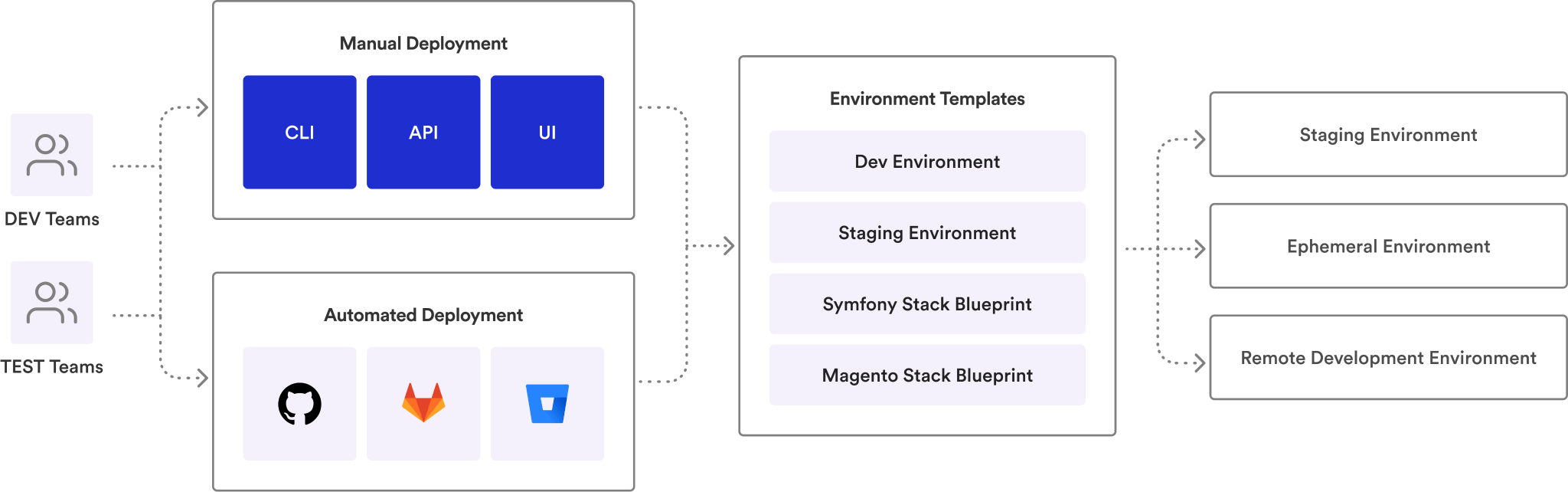
Link your GitHub, GitLab, or Bitbucket repository. Define your environment using Docker Compose, Helm, or Terraform — tools you already use.
 GitHub
 GitLab
 Bitbucket
 Docker
 Helm
Helm K8s
K8sOpen a pull request
Bunnyshell auto-provisions an isolated, full-stack environment for every PR. Share the preview URL with your team.
Merge and move on
Tests pass, code is reviewed, PR merges. The environment auto-destroys. No cleanup. No surprise cloud bills.
See it in action.
Deploy your first production environment in under 30 minutes. Free tier — no credit card required.
Same Definition.
Dev to Prod.
The bunnyshell.yaml that runs your dev environment runs your production environment. Same definition, production-grade infrastructure. No config drift, no environment-specific hacks.
- ✓One YAML, all stages — the same bunnyshell.yaml powers dev, staging, and production environments
- ✓No config drift — environment variables, secrets, and infrastructure defined once, promoted across stages
- ✓Git-versioned infrastructure — every production change tracked in your repository. Full audit trail by default
- ✓Promote with confidence — what you tested in dev is exactly what runs in production. No surprises
Monitoring
& Alerting.
Built-in health checks, resource monitoring, and alerting. Know when something is wrong before your users do. CPU, memory, disk, network, and custom metrics — all visible from one dashboard.
- ✓Health checks — HTTP, TCP, and exec probes for every component. Automatic restart on failure
- ✓Resource monitoring — CPU, memory, disk, and network metrics per pod, per component, per environment
- ✓Custom alert rules — set thresholds for CPU, memory, latency, and error rates. Get notified via Slack, PagerDuty, or webhook
- ✓Incident timeline — correlate deployments with metric changes. See exactly which deploy caused the spike
Autoscaling
& High Availability.
Horizontal pod autoscaling, multi-region deployments, automated failover. Scale with your traffic, not your ops team. Handle traffic spikes without manual intervention.
- ✓Horizontal pod autoscaling — scale pods based on CPU, memory, or custom metrics. Min and max replicas per component
- ✓Multi-region deployments — deploy to multiple regions from the same definition. Latency-based routing built in
- ✓Automated failover — unhealthy pods replaced automatically. Traffic rerouted in seconds, not minutes
- ✓Zero-downtime deploys — rolling updates with configurable surge and unavailability. No maintenance windows
Termination
Protection.
Lock critical environments. Prevent accidental deletions, enforce approval workflows for production changes. Sleep well knowing your production environments are safe.
- ✓Environment locks — lock production environments against accidental deletion. Explicit unlock required
- ✓Approval workflows — require team lead or platform team approval before deploying to production
- ✓Rollback on failure — automatic rollback to the last healthy deployment if health checks fail post-deploy
- ✓Change audit trail — every production change logged with who, what, when, and the approval chain
Production infrastructure
for every role.
Production on autopilot
Autoscaling, monitoring, and alerting configured once. Focus on architecture, not firefighting. Infrastructure as code, promoted across stages.
Deploy with confidence
Same YAML from dev to prod. No environment-specific config to manage. Push, merge, and know your code runs the same way everywhere.
Standardize production
Define production templates with security, scaling, and monitoring built in. Teams self-serve within guardrails you control.
Observability built in
Health checks, resource metrics, and alerting from day one. Correlate deploys with incidents. Mean time to resolution drops.
Reduce ops overhead
Fewer DevOps tickets, fewer late-night pages. Production runs itself. Track deployment frequency and reliability with built-in metrics.
Enterprise-grade infrastructure
SOC 2 compliant, multi-region, auto-scaling. Production infrastructure that meets enterprise requirements without the enterprise price tag.
Same YAML. Dev to prod.
Deploy your first production environment in minutes. Free tier, no credit card required. Free white-glove onboarding.
Teams running production
on Bunnyshell.


“Manual tests on Argo CD PRs now take me seconds. When you review dozens of PRs a day, that's a game-changer.”


“Automatically created BunnyShell environment based on PRs, speeding up the entire task implementation process.”


“The automation and scalability that Bunnyshell provides complements the DigitalOcean platform, empowering developers to build amazing products.”


“Websites don't die anymore, sales keep growing sustained by state-of-the-art tech scalability. Customers send thank you cards.”

“From a release once in 2-4 weeks to multiple times per week, and nobody's stressed about it.”

“I can count on an integrated platform for managing our infrastructure — capabilities we don't have in-house, at a fraction of the cost.”

“I can do with Bunnyshell and a DevOps person what my clients are doing with 4 DevOps people.”

“Developers want convenience. They expect someone to translate their Docker Compose to the cloud. They're not going to rush to learn Kubernetes.”

“Bunnyshell was the only tool that handled our Helm + EKS setup without asking us to change everything.”

“60+ microservices. Bunnyshell deploys them in parallel and lets us control which ones come first.”
Enterprise-grade security.
Your data stays in your cloud.
Bunnyshell connects to YOUR Kubernetes cluster. Your code and data never leave your infrastructure. SOC 2, ISO 27001, and ISO 9001 compliant.



RBAC
Three-layer permission model: Policies, Resource Selectors, and Teams. Granular enough for enterprise.
SSO
Enterprise single sign-on. Integrate with your existing identity provider.
Network Isolation
Dedicated Kubernetes namespace per environment. Pods accessible only within their namespace.
Secrets Management
Environment variables and secrets handled securely. Never hard-coded, always encrypted.
IP Whitelisting
Restrict access to specific IP ranges. Control who can reach your environments.
Audit Logs
Full audit trail for every environment action. Who deployed what, when, and where.
Frequently asked
questions
Can’t find what you’re looking for? Talk to our team
Yes. Bunnyshell manages environments on your Kubernetes clusters, including production. The same bunnyshell.yaml that defines your dev environment defines your production environment — with production-grade features like autoscaling, monitoring, alerting, and termination protection enabled.
Production infrastructure that scales with you.
Start free — deploy your first production environment in minutes. Free tier, no credit card required. Free white-glove onboarding.


