$ bns remote-dev up
Code Locally.
Run in the Cloud.
Cloud dev environments that mirror production. Connect your IDE, start coding in minutes.
No credit card required
Used by engineering teams at






















$ cat how-it-works.md
How Bunnyshell works
Connect your repo
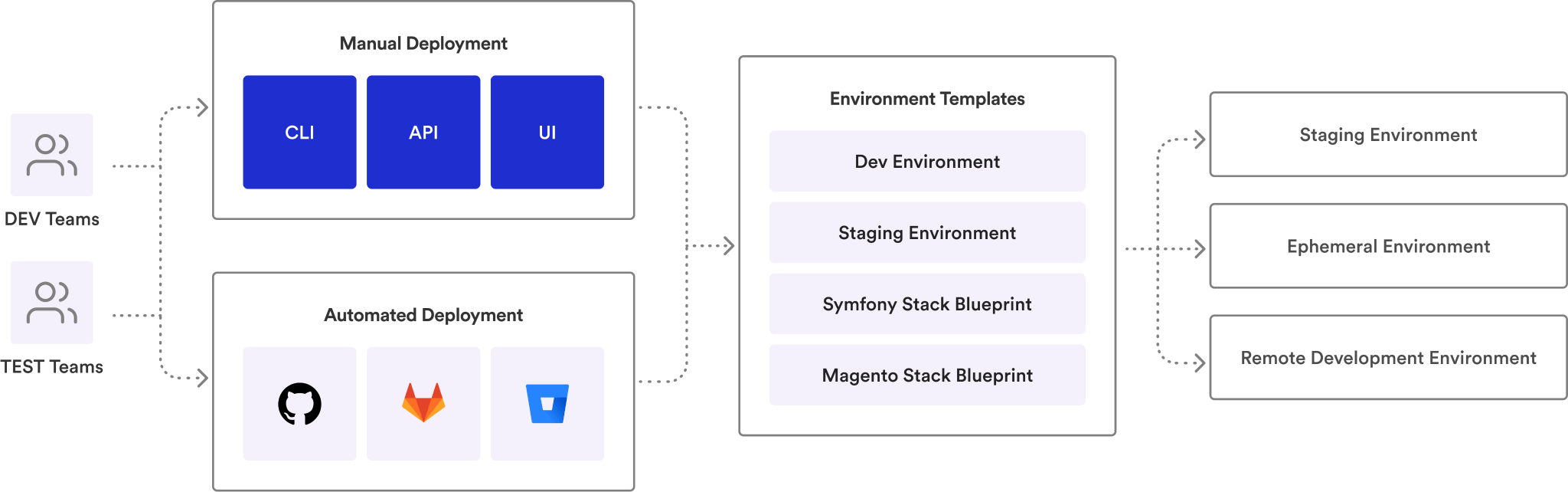
Link your GitHub, GitLab, or Bitbucket repository. Define your environment using Docker Compose, Helm, or Terraform — tools you already use.
 GitHub
 GitLab
 Bitbucket
 Docker
 Helm
Helm K8s
K8sOpen a pull request
Bunnyshell auto-provisions an isolated, full-stack environment for every PR. Share the preview URL with your team.
Merge and move on
Tests pass, code is reviewed, PR merges. The environment auto-destroys. No cleanup. No surprise cloud bills.
See it in action.
Launch your first cloud dev environment in under 30 minutes. Free trial \u2014 no credit card required.
Local IDE.
Cloud Runtime.
VS Code or JetBrains — the tools you already know. Your code runs in a cloud environment that mirrors production. Edit locally, execute remotely. No Docker Desktop, no local dependencies, no conflicting versions.
- ✓VS Code & JetBrains — connect your preferred IDE to a cloud workspace with one command
- ✓Full-stack environment — your app, database, and services running together, just like production
- ✓Zero local dependencies — no Docker, no language runtimes, no conflicting versions on your laptop
- ✓Consistent across the team — every developer gets the same environment, every time
Real-Time
File Sync.
Save a file. See the change in your cloud environment instantly. Bunnyshell syncs your local edits to the remote container in real time — no build step, no deploy wait. Hot-reload works exactly as you expect.
- ✓Sub-second sync — file changes propagate to your cloud environment as fast as saving locally
- ✓Hot-reload compatible — works with Webpack, Vite, Next.js, Nodemon, and any file-watch tool
- ✓Selective sync — configure which paths to sync and which to ignore (node_modules, .git)
- ✓Works over any connection — optimized for bandwidth. Reliable on hotel Wi-Fi, not just office fiber
Remote Debugging.
From Your IDE.
Set a breakpoint. Step through code running in the cloud. Inspect variables, evaluate expressions, trace execution — all from your local IDE. Same workflow as local debugging, but on production-like infrastructure.
- ✓Node.js debugging — attach your debugger to remote Node processes. Breakpoints, watches, call stacks
- ✓PHP debugging — Xdebug integration. Step through Laravel, Symfony, or vanilla PHP running in the cloud
- ✓Java debugging — JDWP remote attach. Debug Spring Boot, Quarkus, or any JVM app in cloud containers
- ✓Multi-service debugging — trace requests across frontend and backend running in the same environment
Port Forwarding
& SSH Access.
Access any remote service on localhost. Forward database ports, API endpoints, or admin panels — as if running on your machine. SSH into any container for logs, migrations, or live troubleshooting.
- ✓Port forwarding — map remote ports to localhost. Access databases, queues, and APIs locally
- ✓SSH into containers — drop into any running container. Inspect logs, run migrations, troubleshoot live
- ✓Multiple services — forward ports from multiple containers simultaneously
- ✓CLI-driven — one command to forward, one command to connect. No UI clicks required
Built for every team member,
not just DevOps.
Open IDE, start coding
No conflicting dependencies. No setup guides. Connect your IDE to a cloud environment and start writing code. Every time.
Day-one productivity
No 2-day onboarding to run the app locally. Spin up a complete environment in minutes and start contributing immediately.
Standardize dev environments
Define environments in code, enforce across the org. Every developer gets the same stack, same versions, same config.
Same experience, anywhere
Consistent regardless of location, OS, or hardware. Berlin or São Paulo — same environment, same performance.
Test on real infrastructure
Access the same cloud environment developers use. Reproduce bugs on the exact same stack, every time.
Cut onboarding time by 10x
New developer? One command to a working environment. Track time-to-first-commit across your org.
Stop setting up. Start shipping.
Launch your first cloud dev environment in minutes. Free trial, no credit card required. Free white-glove onboarding.
Teams that moved development
to the cloud.


“Manual tests on Argo CD PRs now take me seconds. When you review dozens of PRs a day, that's a game-changer.”


“Automatically created BunnyShell environment based on PRs, speeding up the entire task implementation process.”


“The automation and scalability that Bunnyshell provides complements the DigitalOcean platform, empowering developers to build amazing products.”


“Websites don't die anymore, sales keep growing sustained by state-of-the-art tech scalability. Customers send thank you cards.”

“From a release once in 2-4 weeks to multiple times per week, and nobody's stressed about it.”

“I can count on an integrated platform for managing our infrastructure — capabilities we don't have in-house, at a fraction of the cost.”

“I can do with Bunnyshell and a DevOps person what my clients are doing with 4 DevOps people.”
“Developers want convenience. They expect someone to translate their Docker Compose to the cloud. They're not going to rush to learn Kubernetes.”

“Bunnyshell was the only tool that handled our Helm + EKS setup without asking us to change everything.”

“60+ microservices. Bunnyshell deploys them in parallel and lets us control which ones come first.”
Enterprise-grade security.
Your data stays in your cloud.
Bunnyshell connects to YOUR Kubernetes cluster. Your code and data never leave your infrastructure. SOC 2, ISO 27001, and ISO 9001 compliant.



RBAC
Three-layer permission model: Policies, Resource Selectors, and Teams. Granular enough for enterprise.
SSO
Enterprise single sign-on. Integrate with your existing identity provider.
Network Isolation
Dedicated Kubernetes namespace per environment. Pods accessible only within their namespace.
Secrets Management
Environment variables and secrets handled securely. Never hard-coded, always encrypted.
IP Whitelisting
Restrict access to specific IP ranges. Control who can reach your environments.
Audit Logs
Full audit trail for every environment action. Who deployed what, when, and where.
Frequently asked
questions
Can’t find what you’re looking for? Talk to our team
A remote development environment runs your application stack in the cloud instead of on your laptop. You connect your local IDE (VS Code or JetBrains) to the cloud workspace, edit files locally, and your code executes remotely. You get production-like infrastructure without installing anything locally.
One command to a working environment.
Launch your first cloud dev environment in minutes. Free trial, no credit card required. Free white-glove onboarding.


